Tuesday, September 1, 2015

Important SEO terms and guide


What is a website?
It is set of hosted webpages which gets served in browser with a domain name.
Each website has its own unique name called domain name, and a hosting space on hosting server to store the webpages.

What is a keyword?
The search term/query we enter into the search engine for searching something is called a keyword.
Different keywords have different monthly search volume and competition.

What is keyword density?
Keyword density is how many times a keyword appears in a article/content .e.g. if a keyword appears 3 times in 100 word article then its density is 3%
Keyword research can be done using keyword research tools and most popular is google keyword planner. You need a gmail email id to access this tool.
https://adwords.google.co.in/KeywordPlanner
The other keyword research tools are www.wordtracker.com, http://tools.seobook.com/keyword-tools/

Blackhat SEO is SEO practices and tactics done not as per search engine guidelines to inflate the search engine rankings. E.g. keyword stuffing, doorway pages, cloaking

The search engine result page (SERP) for any keyword/query displays list of websites, where each entry of the list consists of title, url and meta description (or a piece of content sometimes).

Onpage SEO is the changes we make on the website for the SEO purpose. Following are the changes we can make in the website for the SEO purpose.

Title tag is a html tag to be entered in the code of the webpage in the section. It can be of around 66 characters. You have to make a meaningful sentence containing keywords in the title and having brand name or business name at the end.
e.g. <title>Manufacture of plastic containers | Niranjan Plastics </title> Manufacture of plastic containers | Niranjan Plastics

Meta description is a html meta tag to be entered in the section of the webpage. It can be of around 166 characters. Make meaningful sentence containing keywords for the meta description.
e.g. <META name="DESCRIPTION" content="We are dealer of calcined alumina, aluminium oxide, organoclay gallant and graphite powder in India ">

Meta keywords are html meta tag where you can enter few of your targeted keywords for the page. Search engines do not use these as a ranking factor.
e.g. <META name="KEYWORDS" content="calcined alumina, aluminum oxide, organoclay gellant, graphite powder, calcium carbonate in India ">

You can view source code of a webpage by pressing CTRL and U simultaneously while viewing a webpage in the browser.

Image optimization
1. Image file name should be relevant to the image an in lieu of space you should use hyphen (-).
e.g. plastic-container.jpg
2. Image should be given a proper and relevant alt tag in html code describing the image.
e.g.<img src="images/sewage-pump.jpg" align="center" width="170" height="255"alt="Submersible sewage pump">

URL renaming and rewriting
URL of a webpage should be SEO friendly containing keywords where ever possible.
e.g. suppose there are 3 products on the website having the webpage name as
product1.html
product2.html
product3.html
These pages/urls can be given relevant product name as
narrow-mouth-jerry-cans.html
open-top-round-drums.html
narrow-mouth-round-drums.html
Instead of space you have to use hypen(-) in the file name as shown above.

URL rewriting is creating seo friendly urls same as above at server end without actually renaming the file name of the webpages.

Anchor text
Anchor Text is the visible, clickable text in a hyperlink.
e.g. Blogging tips
In the above the phrase “Blogging tips” is anchor text and when you click on it, it will go to the website www.blogtraffictips.net

Heading tag
The <h1> to <h6> tags are used to define HTML headings. <h1> defines the most important heading
e.g.
In html code heading tag looks like the following
<h1>Types of plastic containers </h1>
The text becomes bold and large in the visible content due to heading tag.

Bold and italic tag
Text in the content can be made bold and italic using html bold and italic tag
e.g.
<b> this text will appear in bold </b>
<i> this text will appear in italic </i>

What is pagerank?
Pagerank is a rank given by Google between 0 to 10 to a webpage based on quality and quantity of the inbound links to the webpage. Higher the pagerank better for its ranking in search engines.
You can check pagerank of a url by online tool or browser addon.
e.g. http://www.prchecker.info/check_page_rank.php

Robots.txt
robots.txt is a text file webmasters create to instruct search engine robots, how to crawl and index pages on their website.
A example of a typical robots.txt file
User-agent: *
Disallow:
Here first line allows all search engines to crawl the website
Second line does not disallow any url from crawling.
Disallow: /products.html
The above line will block the page products.html from crawling.

Sitemap
A sitemap is a list of pages of a web site accessible to crawlers or users.
XML sitemaps are used to submit to search engines. You can submit xml sitemap using webmaster tools.
You can create and download XML sitemap at website https://www.xml-sitemaps.com

404 error
The HTTP 404 Not Found Error means that the webpage you were trying to reach could not be found on the server.
This means that the webpage is not present or you have typed url incorrectly.
When 404 errors occurs it can be redirected to some other webpage.

301/302 redirect
Status 301 means that the resource (webpage or website) is moved permanently to a new location.
Status 302 means that the resource is temporarily located somewhere else.

How to register a site/domain name and host.
You can book domain name through a domain registrar company/website.

You need to search for the domain name you want and can book it for one year or more
You can book hosting webspace as per your requirement through hosting provider companies

Alexa report
The free alexa report about a website gives you its popularity, its alexa rank based on traffic, audience geography, visitors engagement, top keywords from search engines, its inbound links, audience demographics and more. Paid version will give more details.

Sunday, July 5, 2015

Acronyms related to website, internet marketing, technology and ecommerce

Following are the commonly used acronyms for internet marketing(digital marketing), internet, online advertising, technology, websites and e-commerce.

Digital Marketing related
1) SEO - search engine optimization
2) SMO- social media optimization
3) SMM - Social media marketing
4) SEM - Search engine marketing


Online Advertising related
5) PPC - pay per click
6) CPC - cost per click
7) CPM - cost per thousand
8) CPA - cost per acquisition
9) CTR - click through rate
10) ROI - return on investment
10a) CPV - cost per view
10b) CTA - call to action

Software/Business related
11) CRM - customer relationship management
12) MIS - management information system
13) GUI - graphical user interface

Technology related
14) SMAC - social, mobile, analytics, cloud
15) SaaS - Software as a service
16) IaaS - Infrasturcture as a service
17) PaaS - Platform as a service
18) WAP - wireless application protocol

Website/ Blog related
19) WWW - world wide web
20) URL - Uniform Resource Locator
21) ISP - internet service provider
22) CMS - content management system 
23) JSP - java server pages
24) TLD – top level domain
25) RSS- really simple syndication - (used for web feed or blog feed)
26) UI - user interface
27) UX - user experience
28) CSS - cascading style sheet
29) ASP – active server pages
30) HTML - HyperText Markup Language
31) XML - Extensible Markup Language (blogger.com/blogspot blogs are in XML)

Hosting related
32) SSD - solid state drive (new technology used in hosting servers and computers)
33) VPS - virtual private server
34) SSL- secure sockets layer (ssl certificate used for websites for security)
35) FTP- file transfer protocol
36) DNS - domain name system/server
36a) CNAME - canonical Name record

SEO related
37) PR - page rank ( another meaning of PR is public relations)
38) OBL - outbound link
39) IBL - inbound link
40) PBN – private blog network
41) SERP - Search Engine Result Page
42) LSI - Latent semantic indexing

E-commerce related
43) B2B - business to business
44) B2C - business to consumer
45) B2E - business to employee
46) C2C – consumer to consumer
47) C2B – consumer to business
48) COD - cash on delivery
49) CVV – card verification value (a 3-4 digit number at back of credit card/debit card)

General
50) TOS - terms of service
51) FAQ - frequently asked questions
52) T&C – terms and conditions
53) OS – operating system
54) ORM - online reputation management


If I am missing any acronyms please let me know through comments!

Tuesday, June 15, 2010

Increase blog traffic


How to increase blog traffic is the most important thing every blogger is looking for. For increasing blog traffic, bloggers try hard looking for information and ways and spending lot of time on socializing sites, directories, discussion forums etc.

I find lot of sites have come up giving paid services for SEO, SMO, link building etc. Moreover they advertise openly with proofs, testimonials and google search engine policy is against buying and selling of links, buying paid traffic etc. So only google knows what is legitimate and what is not.

As google search engine algorithm has become more smart nowadays, it is not easy to trick the search engine for top ranking. So it is better to follow google webmaster guidelines
and google search engine optimization starter guide.

To increase blog traffic there are already two posts on my blog related to Search engine optimization and building blog traffic published in 2007, so you can go through these articles to begin with.

As in last two years things have changed. There are now more ways to increase blog traffic using different methods and resources.

So I would like to mention few more tips to increase blog traffic.

1) For search engine traffic, do not depend only on google search engine. Please confirm that all your posts / pages are listed in major search engines like search.yahoo.com, bing.com, ask.com, aol.com.

2) You should know basics of SEO to get top ranking in these search engines. Different search engines give different weightage to factors like meta tags, title, etc. You should also know how to get all your posts / pages indexed in bing.com

3) Keep your template SEO friendly. I have seen some templates with missing h1 tag and missing basics of  SEO.

4) Facebook traffic is now almost equal to google so you must use facebook efficiently to drive traffic to your blog or site. You might be having facebook profile and group but creating facebook page and using facebook application is must for this.

5) Learn how to use twitter to get more followers and how to write tweets.

6) Keep commenting on do follow blogs related to your category with genuine comment given after reading their post.

7) There are other high traffic sites, also giving search facility. You should enter your blog information and create a page for your blog on these sites.

8) Write articles related to your subject and submit to good article directory sites which has high traffic and allows you to give link to your blog. Find the list of few article directories here. Do not worry about whether the links given are do follow or no follow. Please read their submission guidelines before submitting the article.

ezinearticles.com - PR 6
articlesbase.com - PR 6
isnare.com - PR 6 (needs 500 words article)
buzzle.com - PR 6
articlesnatch.com - PR 5
sooperarticles.com - PR 5
approvedarticles.com PR 5
goarticles.com - PR 4
abcearticledirectory.com- PR 4
internetwebportal.com - PR 4 (needs original unpublished article)
articledashboard.com - PR 3
articlesss.com - PR 3
amzines.com - PR 3
articlewarehouse.com - PR 3

9) Everybody knows submitting to bookmarking and socializing sites like delicious.com, stumbleupon.com, digg.com etc. But you also need to know efficiently using these services, type of link they give to your blog, how it is indexed in search engines, etc. You also need to find better bookmarking and socializing sites which work better for subject of your blog because some subjects / niche has limited target audience. e.g. for a pregnancy related blog you can find directories and socializing sites specific for mothers.

Please send your comments and share any new traffic source or methods you find out !

Sunday, April 18, 2010

Optimizing google adsense to make more money from blogging

optimizing google adsenseGoogle adsense is one of the most popular programs used to make money from blogging. Billions of bloggers publishing adsense on their blog always wanted to know how to increase their earnings from adsense. Usually the CTR(click through ratio) of adsense is from 0.5% to 2.5% for blogs having 1000 or more page views per day. But if we can increase CTR we can earn more from same no. of page views.

So here I would like to share my ideas and tips on optimizing google adsense i.e. how to increase CTR. Please note that these ideas and tips are based on my own experiments carried out on 20 blogs.

Let us have a look at the tips one by one. (Some of you might be knowing few of these but please read all the tips)

1) The placement of the ad unit – Should be within the post and ideally below the post title and above the post content. Please note that it should be properly aligned in middle of post body. Use <div style='margin: auto 10% auto 10 %'> your adsense code </div> to align the ad unit. (% value can be changed)
In some cases you have to display the ad unit beside the post content i.e. on right hand side of post content.
Also note that whether the ads are in post or sidebar the right half of the blog screen will get more clicks because most of the people use the mouse with their right hand.
Hence 3 column template with post column in between the right and left side bar is better.

2) The colors of the ad unit - The background and border color should match the background color of the post body. The title color can be blue or matching to the blog text color. Other colors you can choose matching to blog theme and for white background, google default palette is fine. You can also try option of selecting Multiple Palettes which keeps on rotating colors, for 48 hours and check whether CTR is increased or not.

3) The size of the ad unit within the post can be 336X280 or 300X250. In some cases where you are displaying the ad unit on right hand side of the post content, the size can be 250x250 or smaller which ever suits your blog. In case of only picture blog, I have used 120x240 size ad unit on right hand side of the posts.

4) The font size of the ad unit should be medium or large and font family should be Arial or Verdana. You can change this by going to Manage Ads>Edit ad settings.

5) There is option of choosing what to display if no relevant ads are available. Out of the three options, you can choose second option and enter URL of your another blog, so that this blog will be displayed within ad units. You should take care that there should be no google ads in top left of this URL. This is a good way of displaying ads of your low traffic blog on a high traffic blog. Or display your affiliate products page or site.


6) The maximum no. of ad units that can be displayed on a page are three but the total no. of ads displayed depends on the size of the ad unit i.e. in 336X280 ad unit, four text ads can be displayed, so three such ad units will display 4x3=12 ads per page. Some of the ad units can display 2 or 3 ads per unit, making total no. of ads 6 or 9 per page. What I have observed is (not always) less the no. of ads per page, more is the CPC (cost per click). So keep watch on no. of ads per page. CPC of ads also depends on other factors, but discussing that will be off the topic.

7) Link units – can be placed 1) below the header 2) in the side bar with the labels (categories) 3) below the post content.
With the colors matching to the blog colors, they also look like links/labels of the blog, creating higher chances of click. Please note that link unit requires two clicks to generate earnings. In ‘Advance report’ option you can find out how many link clicks got converted to earning clicks.
So even after proper color and placement, if they are not giving higher CTR, please remove them.

8) Adsense for search can be placed in header or upper area of blog. Please note that it requires two clicks to earn from this search unit. So one good option is selecting ‘Search type’ as ‘only sites I select’ while generating code for search unit. Enter all your blogs and websites there, so search results will be from those sites only. Check statistics of search unit in advance reports and decide whether to keep it or not. It has not generated much earnings for me.

9) Always create channel for your ad unit and give relevant name to ad unit as well as the channel so that you can view the performance and statistics in ‘Advance Reports’ and find out which ad unit is performing better.
Also add description with better keywords in custom channels and select proper ad location because this will be seen by advertisers as available place to place their ads.

10) Try to increase your blog rss subscribers and use google adsense for feed. Normally CPC is higher for ads in feed than ads on the blog.

11) Download and install google adsense preview tool
You can visit your blog using IE and right click and select google adsense preview tool and find out which ads will get displayed in which country .You can note down the URL and if you do not want them to get displayed on your blog you can block them by going to Adsense Setup> Competitive Ad Filter . Please read google adsense help for this.

12) Go to Adsense Setup>Ad Review Center > Filtered Categories .You will get % of recent earnings and recent impressions. If earnings are less for a particular category (with respect to impressions) please tick mark and filter them so that next time ads of these categories will not get displayed.

13) Visitor tend to exit from your blog using different links so try to study exit links from your visitors statistics and try to remove unwanted outgoing links from your blog. E.g. I removed a link to statcounter.com in visitors counter and created a counter without link.

14) Check whether all your posts are there in major search engines. One of my blog has 650 posts and search engine has indexed only 360 posts. So this will give me less traffic and less clicks. You can use sitemap and google webmaster tools to solve this problem.

15) I have read that one should write on higher paying keywords but this can not be a tip because say higher paying keywords are Lawyer, Insurance….Now if my blog is on Blog traffic tips, how can I write on these topics? So it is true only for few blogs which are writing on any subject. Only thing you can do is try using better keywords related to your post subject, in post title and content.
Another tip I have read is increase blog traffic but this is a different topic and it is not relevant to optimizing google adsense as it does not increase CTR.

16) From visitors statistics you can find from which country you are getting maximum clicks ( generally it is U.S.) so if you are using paid advertising to advertise your blog, select geographical locations from which you are getting more clicks.

Some times there is sudden peak up or drop in CTR which is due to type of ads getting displayed on our blog and we can not control it so I am not discussing it here.

Please try above tips one at a time and apply it for 48 to 72 hours and then check whether CTR has increased or not. Please share your experience and any new tip you find out!

Tuesday, February 16, 2010

How to change blogger template - update

change blogger templateI receive many visitors on this blog for 'How to change blogger template' post. This post was written in January 2009 i.e. one year back.

Recently the blogger.com as come up with many new and updated features. They have also updated the feature of changing to third party template.

Earlier when we were uploading the third party template the widgets were getting lost , so we need to take backup of this widgets i.e. saving code of each widget.

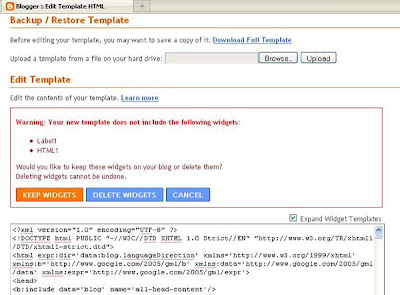
Now after uploading the new template from PC when we try to save it , it asks whether we want to 'Keep widgets' or 'Delete widgets' as shown in picture below.


So you need to click on 'Keep widgets' and then view your blog. Sometimes it is found that the widgets are not at proper place i.e. sidebar widgets can be in header. So go to 'Layout> Page elements' and drag your widget at appropriate place and then click save. Now again check your blog . It is ready with your new template !

Do not forget to take backup of your original template before going for this template change process by clicking on 'Download Full Template' option as shown in image above and save it on your hard disk. And read my earlier post 'How to change blogger template ' for all other steps.

Thursday, June 18, 2009

Blog traffic from Youtube

youtube trafficHow to get blog traffic from youtube? Uploading video to youtube is easy but what can we do to generate traffic to our blog from the video?

Here are important ideas and steps which helps to bring traffic from youtube video.

First I will list three basic steps and then will discuss each step in detail.

1) Create your own video
2) Register with youtube and Upload your video with correct title.
3) Incorporate and mention your blog url at appropriate places on youtube.


1) Now we will look at first step as what kind of video can be prepared?
You need something related to your blog subject. Website owners use youtube for marketing and selling their products with sales video but I am not talking of that.
We need video related to our blog subject. In general humorous video, how to video, some catchy dance and music video, amazing and interesting facts video, educational video etc. will catch attention and will get many views.
e.g. I can prepare video related to some of the posts on this blog as How to shift to custom domain,How to get blog traffic or How to make money from blog.
Many bloggers have personal blogs so they can have video on making some recipe, how to swim or some kitchen tips and tricks, funny video of their animal or pet, video of the places they have visited, video of sports they play or teaching or giving tips on some sports, video on party they have organized etc.

You can capture video using webcam, cellphone or handy cam or whichever is most suitable. Youtube accepts many file formats for video uploading so file format is not big issue but if you go for high quality video then file size is too large. So normal resolution is ok. Also read youtube help regarding this. Video file size also increases with the time so as far as possible keep video length from 5 minutes to 15 minutes.(for few subjects it can be longer). Picture and sound quality should be clear and if you know little of video editing it helps you to edit the video.

2) If you are not already registered, you need to register at youtube.com. After login you will find a yellow color Upload button on right hand corner. Then click on Upload video file. Then clicking on Upload video gives you a browse window to choose video from your computer hard disk and upload it. You also have to enter title, description,tags and category. And then click save. It takes some time for your video to go live. Since your video will appear in youtube search result based on video title and description, it is very important to choose correct post title and description. Hence do some research on youtube by searching related videos and enter the keywords you are looking for in your video title and description. Also enter your blog url in description.

3) Now you need to add your blog url in the video. Go to my video and then Annotations then click on Add note (see the image below) it gives you a window on the video asking "Enter your text here". Type your blog url here then you can change color if required , then holding mouse cursor you can drag it from center to one of the corner so that it does not come in the way of watching video.
blog traffic from youtube
Now you have to choose time period for which this will appear on video so you can select full time starting from 0.0 to full length of video. Now you have to click on save and publish.
Check your blog url is appearing on video or not.
You also need to enter your blog url in your profile. You need to go to Account > Profile setup > website. See the picture below.
blog traffic tip youtube
Now logout and search youtube with keyword you have mentioned in video title and see where you can find it in search results and watch the video. You can fine tune the video title and description if required for better ranking. Send emails to your friends giving url of video and asking them to watch the video and rate it. Getting few higher ratings creates good impression on visitors.


Your account at youtube also has insight and statistics option under My account where you can come to know from where visitors has come to watch your video.
So what are you waiting for ? Shoot a video and fire!

Sunday, June 14, 2009

Blogging tips for beginners - Part 2

These blogging tips are update on my last post on Blogging tips for beginners. These are mainly using some blogger.com features which are actually useful but rarely used by bloggers.

Blogging tip #26 - Scheduling

Please write regularly for your post because search engine likes blogs which are updated regularly.
Many times due to lack of time or other reason we do not get time to write for the blog so when ever you have some thoughts or ideas to write something straight a way write into new post and do not publish but save as draft. Later on add and edit into it as you get time.
Also there is one feature on blogspot blogs called scheduling. So when ever you are writing more than one post do not publish them at a time. Rather than this , publish one post and schedule the publishing of more posts on future dates. You can do this by clicking post options below the post editor window and then change date , time under Post date and time and then click publish. See the picture below (click to enlarge).

blogspot-scheduling
Wordpress blogger can do this by entering future date and time located at Publish window on right hand sidebar. See the picture below.

wordpress-scheduling
This helps you to take vacation from blogging , search engine benefit and good impression on visitors.

Blogging tip #27 - Adding free content

The other important feature of blogger.com is you can have free relevant and interesting content for your blog with add video bar and newsreel option. You need to go to Layout > Add a gadget > then select Video bar or Newsreel . You can enter keywords related to your blog subject and save. This will display related content on sidebar of your blog. This content gets updated automatically.
e.g. check news on right hand sidebar of Vegetarian Bloggers.

Blogging tip # 28 - Adding special gadget

When we click on Add a gadget a list of basic 20 gadgets is shown.But if you look at left side you can find categories as new, tools, communication, fun and games, finance, sports, life style and technology. There are thousands of gadgets for each category so you can find gadget suitable to your blog subject.
e.g.I have added a domain check gadget on right hand side bar of this blog from technology category.
Check sidebar of Urja's Paintings blog for fish game.

blogger-gadgets,blogging tips

I will keep more blogging tips posting . Please leave your comments.


Thursday, May 28, 2009

25 Blogging tips to build better blog for beginners

During my surfing of the net and participation in discussions I came across many blogs and bloggers.
After looking at their blogs and blogging help they have asked for I decided to write this post about blogging tips so that by using these blogging tips they can do better blogging and make their blog better.

You may already have a blog or want to start a new blog so I will list my tips starting from choosing the blog name (domain name)

Please read following 25 blogging tips to build better blog .

Group #1 - Blogging tips for starting a new blog or writing new post.These are important for search engine optimization.

1) First do the keyword research for the blog topic / subject . Please read my post on keyword research .Finding popular keywords related to your blog or your post topic is must.

2) Try to use the keywords in domain name, blog title, post title, post content,hyper link , ALT tag, TITLE tag etc.in a natural way.This will help you to get higher search engine ranking.

3) Try to limit no. of your labels / categories around 20. Use tag cloud or label cloud if you want to save space. If you have many topics on one blog try to regroup and relabel. If totally different topics are mixed on one blog and has sufficient no. of posts for each topic then start new blog for that topic.

4)Do not copy old posts of a blog on new blog.You can get penalized for duplicate content. You need to remove old copy from the search engine and then add same post at new blog.

5) Use post title optimization widget on this blog for blogger / blogspot blog so that you get better search engine ranking. Wordpress bloggers can use plugin like All in one SEO for meta tag and title optimization.


Group #2 - Blogging tips related to look and content of the blog.

6) The look and layout of the blog should be nice, neat and beautiful so that it can create good impression on the visitor and he should feel to stay more and visit again. Content quality should also be good for this.

7) Navigation and layout should be such that visitor should be able to find the recent posts, labels very easily. So if Recent posts and Labels are near top of side bar it will be visible in first screen of the blog and the visitor will have a quick idea of what the blog is about and can jump to his topic of interest quickly.

8) Use pictures , images wherever possible to make your post colorful and attractive.
Do picture / image optimization as described in my earlier post. No need to use large images , you can use medium to small images .

9) Loading time of the blog should not be very long or visitor will run away before the page opens. So keep check on what widgets / code you are installing and does it slows down the loading. If you are loading pictures , make sure that the file size is not big .Do not use BMP files , you can use jpg , png files. Also check image size. You can do all this using photoshop. As sometimes images load slower from external sources , check that also.

Group #3 - Blogging tips related to writing and visitors

10) Write your post after proper research and gathering total information . Do not write too long.
Use grouping , paragraph , sub titling for arranging the information in post body.

11) Writing language should be easy to understand and wherever possible write in humorous way. If visitor enjoys your post he will come back.

12) Give links to useful resources related to your topic. Also give links to your earlier posts with proper anchor text wherever possible. This improves internal linking of your blog.

13) Encourage the reader to participate / comment . You can also run some contest or survey on your blog and keep some prize for that.

14) Use beautiful and professional looking theme / template and header image for your blog.
There are many free templates available so you can easily get one suitable to your blog.
Choose 3 column template which uses full 1024 X 768 resolution.This gives you more space.

15) The font color and size should be such that blog should be readable in different screen resolution.

Group #4 - Blogging tips to increase readers and revenue.

16) Burn your feed at feedburner and provide subscribe via email facility for your RSS feed .

17) Check your blog visibility and feed in different browser. Especially in internet explorer and firefox.

18) Try to increase your RSS feed subscriber and use adsense for feed to display google adsense on the feed.

19) Use google adsense or other advertisements in post body , right hand side bar and below the header . Use adsense link unit with labels or links or below header. Match background color of adsense with blog or post background color.

20) Read my post on blog traffic tips to build traffic from sources other than search engine.

Group #5 - Following are precautionary blogging tips (what not to do)

21) There should not be many outgoing links (pointing to other websites / blogs) in the post or side bar. Remove unnecessary outgoing links. Place all outgoing links near bottom of right hand side bar or footer.

22 ) Do not buy or sell links for link building.

23) If paid posts are must for you keep it minimum or have separate website / blog for paid posts or articles.

24) As said above do not write same post again ( duplicate content ) . Do not edit old post titles and content for search engine optimization .

25) Do not have METATAGS only for main home url of blogger blog , as it will be used for all the post and you will get duplicate metatag error in google webmaster tools. You are also misguiding and confusing search engine by having same meta tag for all posts . So you can use script / widget which can give different METATAGS to individual posts. Wordpress blogger can have METATAG for individual post by using All in one SEO plugin.

I hope these blogging tips covers all important aspects of blogging . Please write your comments and any tips you have !

Thursday, May 21, 2009

Add adsense ad, link unit or page element below header

Many blogs have good blogger template and they want to add the google adsense link unit or google adsense ad below header or title. How to do it?

For this purpose either they can change the whole template or do the simple html code editing mentioned here. This widget / trick actually gives additional 'Add gadget' (add page element) option above the header.

Go to your Dashboard > layout > edit HTML > then search for

<div id='header-wrapper'>
<b:section class='header' id='header' maxwidgets='1' showaddelement='no'>
<b:widget id='Header1' locked='true' title='your blog title (Header)' type='Header'/>
</b:section>
</div>

Now you need to edit this code as shown below

change maxwidgets='2'
change showaddelement='yes'
change locked='false'

your code should now look like this

<div id='header-wrapper'>
<b:section class='header' id='header' maxwidgets='2' showaddelement='yes'>
<b:widget id='Header1' locked='false' title='your blog title (Header)' type='Header'/>
</b:section>

Now go to Layout , you will find Add a gadget option above the header . Now click on it and you can add adsense link unit or ad unit or some other gadget. Then click save.

Your adsense ad will start showing above the header.

But suppose you want it below the header then how to do it ?

Sometimes you can not drag it in layout screen . So again go to Edit HTML and search for the code and then swap the lines as shown below and then click save. Now your ad unit is below the header.

<div id='header-wrapper'>
<b:section class='header' id='header' maxwidgets='2' showaddelement='yes'>

<b:widget id='Header1' locked='false' title='your blog title (Header)' type='Header'/>
<b:widget id='AdSense1' locked='false' title='' type='AdSense'/>
</b:section>

Sunday, May 17, 2009

Show total posts - total comments script widget

On right hand side column of this blog traffic tips blog you can see total number of posts and total number of comments.

How to show total number posts and/or total number of comments on your blogger blog ?

Here is script to show total number of posts and comments . You have to add this java script
by going to Dashboard > Layout > Add a gadget > HTML /Java script

Then copy following java script .

Please change blog url from www.blogtraffictips.net to yourname.blogspot.com in the following script.


<script src="http://www.blogtraffictips.net/feeds/posts/default?orderby=published&alt=json-in-script&callback=rp"></script>

<script style="text/javascript">
function numberOfPosts(json) {
document.write('Total number of Posts: <b>' + json.feed.openSearch$totalResults.$t + '</b><br>');
}
</script>
<script src="http://www.blogtraffictips.net/feeds/posts/default?alt=json-in-script&callback=numberOfPosts"></script>


<script src="http://www.blogtraffictips.net/feeds/comments/default?orderby=published&alt=json-in-script&callback=rp"></script>

<script style="text/javascript">
function numberOfComments(json) {
document.write('Total number of Comments: <b>' + json.feed.openSearch$totalResults.$t + '</b><br>');
}
</script>
<script src="http://www.blogtraffictips.net/feeds/comments/default?alt=json-in-script&callback=numberOfComments"></script>


The first half can be used to display only total no. of posts and second half can be used to display only total no. of comments.

Post title optimization for blogger blog

Earlier I have written two posts for title optimization - What is title optimization and Title optimization widget

But there was one problem with this widget . After installing this widget one can not shift the page elements , it gives error when you click on save after shifting.
So there was request to find a error free title optimization widget or script.

First we will understand what is post title optimization . Normally the title of the post appears on top of browser as Blog title + Post title . i.e. the title of this post will normally appear as
Blog traffic tips to make money : Post title optimization for blogger blog . But since title optimization is done on this blog it appears as only Post title optimization for blogger blog. This is important to get proper weightage in search engine for the keywords used in post title.

Now how to do this ?

Go to Dashboard> Layout > Edit HTML
Then search for


<title><data:blog.pageTitle/></title>


Then replace it with following code
<b:if cond='data:blog.pageType == "index"'>
<title><data:blog.title/></title>
<b:else/>
<title><data:blog.pageName/></title>
</b:if>

Then click on Save template . Your post title optimization is done.

Now check the individual post of the blog . And look at top of the browser for title .


Sunday, May 10, 2009

How to shift to custom domain

You must have noticed the new domain name www.blogtraffictips.net for this blog and I thought the whole experience will be useful to my blogger friends and hence writing this post.

You can buy domain name of yours from any domain registering company , the pricing are ranging from $5 to $10 (lees with hosting packages) per year. But if you buy from any company other than google/blogger dashboard than you need to change CNAME record in the domain name control panel.

Now how to shift to custom domain using our blogger dashboard ?

From dashboard go to settings> publishing > then click on switch to custom domain >
Now you have to choose the domain name , the extension available are .com, .org , .net, .biz, .info

Please see the picture below ( click to enlarge )

custom-domain
After choosing the domain name , you have to make the sign up and payment procedure.

Your custom domain name starts working within few minutes . (my experience) .

Now what are the advantages and disadvantage of shifting to custom domain ?

Benefits or advantages of shifting to custom domain

1) You get your unique identity for your blog owned by you. Makes you also feel little better.
2) You get more and better advertisers . You may get higher paying cpc or ppc ads .
3) Many advertising network programs do not allow publishers with free domain , so you get approved there.

As your old url will be there in search engines , blog directories etc. what about the traffic coming from all these sources to your old url ? There is no need to worry as blogger / blogspot gives you facility of redirecting all your traffic to new custom doamin url .

Disadvantages

Are there any ? yes

You have all you internal and external links in posts, blog directories etc. pointing to your old url ( yourname.blogspot.com) so it is better to change it to your new custom domain name (yourname.com) . Please check your blog is pointing to http://yourname.com or http://www.yourname.com and use the new url accordingly. it is important from search engine point of view.

Now think of what happens to your search engine entries and ranking and also alexa rankings ?

Awaiting your comments ....

Tuesday, March 3, 2009

Privacy Policy

We use third-party advertising companies to serve ads when you visit our website. These companies may use information (not including your name, address, email address, or telephone number) about your visits to this and other websites in order to provide advertisements about goods and services of interest to you.

  • Google, as a third party vendor, uses cookies to serve ads on this site.
  • Google's use of the DART cookie enables it to serve ads to users of this site based on their visit to this sites and other sites on the Internet.
  • Users may opt out of the use of the DART cookie by visiting the Google ad and content network privacy policy.

Monday, January 5, 2009

How to change Blogger blog template

Personally I feel three column blogger templates are better and I have mentioned resources for free blogger templates in my earlier post free-blogger-templates-resources

So you may want to change your blogger blog template to a better professional looking template and here is guide for it.


To change blog template please follow the following steps

Steps for installing default blogger templates

1) After login to your blogger account go to

Dashboard > Layout > Pick new template

Then you can choose from available templates on blogger.com and click Save template.
You need to save widgets before doing this as mentioned below.

Steps for installing third party blogger templates

1) Suppose you want to install some other third party template which is not on blogger website.
Then you can download the template you like from the website and can save that template on your hard drive .

2) Then you need to backup your original template first. For this from Dashboard go to > Layout > Edit HTML > Download full template > choose save to disk and save it on your hard disk.
This backup is helpful if anything goes wrong with new template.

3) Now when we change template , the widgets are lost .Widgets are your added page elements like visitors counter , html script , link list etc. So you need to download code of each widget properly name it and save it with notepad as a text file. To copy code of each widget you need to go to Page elements then edit and you can view the code of respective page element which you can copy and then paste in Notepad.

4) Now go to Dashboard > Layout > Edit HTML > Browse
Choose saved template from your hard disk and click Upload.
This will give you warning for widgets to be deleted.
Then you can continue with save template.
Your new template is installed , so view your blog and check it

5) Now start installing each widgets you have saved earlier by going to Page Elements > Add a Gadget.

Hope this post is useful and works out.

Visit blogadda.com to discover Indian blogs

blog directory

Monday, February 25, 2008

Blogger Help

From the comments I receive on this blog , I feel my posts are useful to bloggers. That was the main intention of starting this blog and I get encouraged by this comments and I do receive different queries asking for different types of blog related help.
So I thought of starting a Blogger help section here where you can ask any help related to your blog .You can also answer other bloggers question. This way we will be able to help more and more blogger to grow and succeed .

Following are the Frequently Asked Questions (FAQ)

1) How to increase my blog income ? Or make money online ?
2) How to increase my blogs traffic ?
3) How to add google adsense in post body ?
4) How to get higher search engine ranking ?
5) My blog is not listed in search engine.
6) All my posts/pages are not there in google /yahoo search engine index.
7) How to use Stumble upon or Digg for getting more traffic.
8) What is title optimization?
9) How to optimize google adsense on my blog?
10) Which advertising or affiliate program I should use ?
11) What are popular keywords for my blog ?
12) Where can I get free blogger template ?
13) How to use webmaster tools?

and more ...
I have already answered some of this by writing posts on this blog and by email.

So please fell free to ask your question here. Or leave your comment here.


Visit blogadda.com to discover Indian blogs

Wednesday, February 13, 2008

Adding Google Adsense anywhere in blog post

If you have a blogspot /blogger blog and want to add Google adsense anywhere in your post body you have come to right place !
In post body you can add google adsense at
1) Top of the post , below the title of the post. ( 468 x 60 or 336 x 280 google adsense unit)
2) A 200 x 200 google adsense unit at right or left hand top corner of the post.
3) At bottom / footer of the post above comments . ( 468 x 60 or 336 x 280 google adsense unit)

Please note that you have to add the google adsense code ( procedure given below) only once in HTML code of your blog template and the google ads will appear in three latest posts as only 3 such units are allowed by Google Adsense. So from fourth post you may observe a blank space in your post.

To add the Google adsense in your blog post following is the steps summary.

1) Generate Google adsense code with the size and colors of your choice.
2) Parse the google adsense code .
3) Copy and paste parsed code at appropriate place in html code of your blog template.(please save your original template before this)
4) You may need to add some html code line for aligning your adsense unit on left , right or center of the post body.

Now above steps in detail :

1) Step 1 is easy as everybody knows to generate google adsense code by logging to their google adsense account.

2) For step 2 you need to copy your google adsense code and paste it at parse your code here
Generate parsed code by clicking on Parse .

3) Now copy this code .Then go to your Dashboard > Layout > Edit Html > Click on Expand Widget templates . Now you have to paste the code at appropriate place as shown in picture below in red color . You can use search option of the browser to search the code shown . Paste the code at any of the one place from the three choice shown.


Adding Google Adsense
Now you can save your template . Please save your original template before this step.

4) Now check your blog , your google ad may not be properly aligned . So you need to add one line of html code before and after the google adsense code .

I will soon add a picture here for this alignment code.

Also note that there are some free blogger templates available on internet where you can directly add google adsense unit at post bottom by going to Layout > Edit ( Blog Posts) > then tick on 'Show Ads Between Posts' .

Monday, January 7, 2008

Making money online

Oh no! This can be your first reaction looking at Title 'Making Money Online' of this post because

Making money online,How to make money online
The internet is flooded with Making money online blogs and websites. Most of these articles are about which advertising program or affiliate program to use on your blog and how to use those advertising programs. But these articles are missing one very important point. And the point is

YOU NEED TO HAVE GOOD TRAFFIC ON YOUR BLOG/ WEBSITE FOR ANY ADVERTISING OR AFFILIATE PROGRAM TO GENERATE REVENUE FOR YOU or TO MAKE MONEY ONLINE.

So even though this blog is not having any post directly on making money online , it is a blog on Making money online. Using tips mentioned in my earlier posts you can have good traffic on your blog within 3 to 5 months coming form various sources like search engine, blog directories, socializing sites, discussion, forums etc. Once you have traffic of say 500 to 1000 visits per day (not visitors) , even if you use advertising program like google adsense , which is readily available for blogspot users in their 'Add page elements' option, you can start making $1 or $2 per day (or even more :)). If you need any help or have any query in this regard please leave a comment here .


Thursday, December 27, 2007

Free Blogger Templates Resources

To have a better look for your blog or to have 3-column blog templates you need good template resource from where you can download the template and use it free for your blog.
So here I am mentioning free blogger templates resources which you can use. Personally I like 3-column blog templates because we can add more page elements including more google adsense ad units. I have selected these resources based on following criteria

1) They are suitable for different blog topics. Their look is good and professional.
2) There are 2-column blog templates and 3-column blog templates.
3) Some of the templates are SEO friendly.
4) Some templates has facility to add google adsense code into post body.

This templates are for blogger/blogspot users. I will add resources for wordpress users later.

http://freshbloggertemplates.blogspot.com/
http://www.finalsense.com/services/blog_templates/index.htm
http://blogger-templates.blogspot.com/
http://webtalks.blogspot.com/2007/04/downlaod-three-column-new-
blogger.html
http://freeskins.blogspot.com/
http://www.eblogtemplates.com/templates/blogger-templates/

I will keep updating this list. If you know any good resource for blog templates please leave a comment here .

Saturday, December 22, 2007

How to add video to blog post

In my earlier post , I have discussed about adding and optimizing pictures on blog post . Today we will discuss adding video to blog post.This article is for blogger / blogspot blogs only. Adding video to blog post makes it more interesting and attractive.
You can add video from three main sources.
1) Video stored on your computer harddisk. You might have shoot it using your cell phone and then downloaded to your PC.
2) Video from youtube.com
3) Video from video.yahoo.com

Now we will discuss how to add video from this three sources

1) For adding video from your PC , please go to create new post then in the post toolbar you will find a 'Add video' button or icon , at second last position from right hand side as shown below.

Add video to blog postThen you have to select file from your PC by clicking on Browse , then give title and click upload video. But please remember that your video file format should be AVI, MPEG, QuickTime, Real, and Windows Media. And maximum file size of 100MB . If you have saved your video from cell phone , file format can be different , so please convert it to any of above format using proper video conversion utility software.

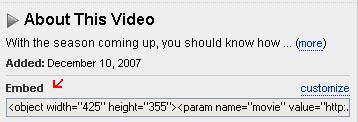
2) For adding video from youtube.com , after going on this site , you have to select the video you want to add. Then on the right hand side of the screen or browser window you will find Embed and html code written there as shown below.You have to select that code and paste into your post in edit html mode.

Add youtube video to blog postYou can change size of window for video by changing width and height pixels.

3) For adding video from video.yahoo.com , after going to this website you have to select your video.Then below the video it is written Add to site and the html code will be there as shown below. You have to copy this code and paste it on you blog post in Edit html mode.


Add yahoo video to blog postYou can resize window size for video by changing width= and height= pixel no.s

I hope you like this post and is useful to you.

Saturday, September 22, 2007

11 Sources and Tips for Building Blog Traffic

In my earlier posts, I have mainly written about search engine optimization , because it starts form choosing domain name , so new blogger can have benefit and bloggers who are already having blogs can optimize their new posts.

But search engine though a main source for traffic , it is not the only the source which a blogger should explore for traffic. There are many other sources for blog traffic and in this post we will discuss about that.

We will list those blog traffic sources with some explanation and list websites where you need to sign up. So I am trying to give information as What to do ? How to do it and where ( which websites) to do it, to make it easier for new and average bloggers. And they need not run here and there finding resources.

Following are the 11 blog traffic sources which you can use for your blog.

1) Source #1 : Blog directories :You need to submit to few popular blog directories after you have at least 5- 10 posts on your blog. Most of the blog directories will ask you to give reciprocal link on your blog. In some cases you need to enter reciprocal link url , then you can create a new post for giving links to such directories rather than giving link on main page of the blog. If they ask for RSS feed please enter http://yourblog.blogspot.com/rss.xml. You also need to enter your keywords as Tags or generate tags . Some directories will ask for specific size banner , so design a banner using software like photoshop , upload it at free space like pages.google.com and provide the link of the banner to the blog directories. For example banner for this blog is at http://umeshsmiles.googlepages.com/blog-traffic.jpg
Popular blog directories are listed below which allows free submission , please do not go for paid submission.

2) Source #2 : Comments, Emails, Profiles , chat , groups :
You need to comment on other blogs , develop relations with bloggers . This leads to visits from this blogs and bloggers.
You can send at least 10 emails per day writing about your blog and requesting to visit .Please do not send bulk mails or spam mails. You can mention about your blog in your profiles at google, yahoo, myspace , facebook etc. and also in chats, groups. You can answer at websites like answers.yahoo.com for related questions mentioning about your blog.

3) Source #3 : Linking to other blogs:
 You can ask for link to your blog or post to other blogs and you also need to reciprocate by giving link to other blogs or posts. This leads to link building and more traffic . Link building is beneficial for search engine ranking.

4) Source #4 : Forums, discussions,community, groups :
 From the list of websites given below, on many of them you will find discussions , groups , forums, communities .You can join groups /communities or create new one .You can take part in discussions /forums. Ask for help or give help. This leads to more traffic to your blog.

5) Source #5 : Socializing :
Digg.com:Socializing site.You can find more here - http://digg.com/about .
What all you can do at digg.com is at http://digg.com/how

StumbleUpon.com is a social network . You need to download and install a toolbar, then, when surfing the net, if you like a page and you want to share it with the community, you press a button (you stumble the page), and the page goes into the StumbleUpon circuit. On the toolbar, you also have the Stumble button, which, once pressed, shows you pages stumbled by other members.You can use stumble upon without toolbar also, once you have a account there.

6) Source #6 : Writing and submitting articles/ posts/ reviews : 
You can write articles for others / reviews for products or services. Please check websites like payperpost.com , reviewme.com

7) Source #7 : Converting new visitor to regular visitor
 -
Write better providing sufficient information on the subject with proper home work done. Group /Categorize / List /Organize the content properly so it becomes easier to read and understand . Add pictures and video where ever possible to make post colorful and attractive. Rather then writing longer, cover all information in less words because on internet , visitor wants more information in less time.
Providing rewards, free e books, contest etc - You can provide some type of reward to visitors /bloggers like link or few dollar prize for comments /review of your blog or have a contest on your blog . You can write a e-book yourself and offer to download it free or you can use free e-books available on internet . This encourages visitors to stay more , visit again , subscribe to your blog posts etc. Please note that buying and selling of links is against search engine guidelines/policies.

8) Source #8 : Branding , banners, free banner exchange :
You can think of nice logo / banner /header picture for your blog with a slogan /punch line for it. You can use that logo on you posts , emails , profiles etc . As your blog grows and if related to business/products/service, you can go for brand name . While submitting your blog to directories ,some of them asks for banner so you can submit your banner here. There are free banner exchange programs run by blogs and blog directories , you can participate in that. I will try to provide list of websites for this.

9) Source #9 : Try other media :
 Think creative . Where else you can mention about your blog or display your blog . Some newspapers allows you to submit your post to them and they publish selected posts in their newspaper with blog name. So try sending your blog posts to print media.Can you display your blog url on your vehicle ? Your t-shirt?

10) Source #10 : Paid promotion :
All the above options are free to use but you need to spend many hours on internet . So if you do not have time , you can go for paid blog advertising like google adwords and other paid promotions .Please do not buy links .Please keep good and sufficient content on your blog and basic blog promotion done before going for advertising .

11) Source #11 : Mobile blogging :
Blogspot offers you to post using your mobile. Many socializing sites now offer mobile future, this saves on your time .So if you efficiently use this feature you can save time to be active more at other promotional activities which leads to more traffic.


List of the websites ( I will keep this updating) :

1) Blogcatalog.com - Blog directory ,discussions , Groups.
2) Blogskinny.com - Blogdirectory
3) Topblogarea.com
4) Blogflux.com - Directory , forum ,Polls
5) Blogtoplist
6) Bloghub
7) Getblogs.com
8) Bloglisting.net
9) Blogdirs.com
10) bloggernity.com
11) Stumbleupon.com
12) Digg.com
13) Bumpzee.com
14) Mybloglog.com
15) Blogrush.com
16) Reviewme.com
17) Payperpost.com
18) Blogcrowds.com
19) Topblogging.com
20) Topofblogs.com
21)Entrecard.com - banner exchange by credit earning.


Managing better : You need to register on above sites so it is better to keep a separate email address for blogging and common username , password for all these accounts. Also wherever possible subscribe/forward all your discussions , replies, comments to this email id so that you can check them all in one session and does not miss anything and more you remain active at any of the websites , more will be your points /visibility /traffic.

I will keep updating this post .Please tell how you find this post, your comments and suggestions are welcome.