To have a better look for your blog or to have 3-column blog templates you need good template resource from where you can download the template and use it free for your blog.
So here I am mentioning free blogger templates resources which you can use. Personally I like 3-column blog templates because we can add more page elements including more google adsense ad units. I have selected these resources based on following criteria
1) They are suitable for different blog topics. Their look is good and professional.
2) There are 2-column blog templates and 3-column blog templates.
3) Some of the templates are SEO friendly.
4) Some templates has facility to add google adsense code into post body.
This templates are for blogger/blogspot users. I will add resources for wordpress users later.
http://freshbloggertemplates.blogspot.com/
http://www.finalsense.com/services/blog_templates/index.htm
http://blogger-templates.blogspot.com/
http://webtalks.blogspot.com/2007/04/downlaod-three-column-new-
blogger.html
http://freeskins.blogspot.com/
http://www.eblogtemplates.com/templates/blogger-templates/
I will keep updating this list. If you know any good resource for blog templates please leave a comment here .

Blogging tips, Blog traffic tips, Optimizing google adsense, Blog tips and tricks for better blogging, SEO services, Making money online, Blog widgets, Blogger templates, Search engine optimization, Social Media tutorials, Digital Marketing Training and Services
Thursday, December 27, 2007

Saturday, December 22, 2007
How to add video to blog post
In my earlier post , I have discussed about adding and optimizing pictures on blog post . Today we will discuss adding video to blog post.This article is for blogger / blogspot blogs only. Adding video to blog post makes it more interesting and attractive.
You can add video from three main sources.
1) Video stored on your computer harddisk. You might have shoot it using your cell phone and then downloaded to your PC.
2) Video from youtube.com
3) Video from video.yahoo.com
Now we will discuss how to add video from this three sources
1) For adding video from your PC , please go to create new post then in the post toolbar you will find a 'Add video' button or icon , at second last position from right hand side as shown below.
 Then you have to select file from your PC by clicking on Browse , then give title and click upload video. But please remember that your video file format should be AVI, MPEG, QuickTime, Real, and Windows Media. And maximum file size of 100MB . If you have saved your video from cell phone , file format can be different , so please convert it to any of above format using proper video conversion utility software.
2) For adding video from youtube.com , after going on this site , you have to select the video you want to add. Then on the right hand side of the screen or browser window you will find Embed and html code written there as shown below.You have to select that code and paste into your post in edit html mode.
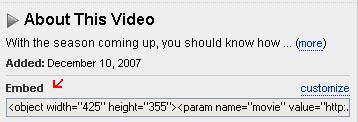 You can change size of window for video by changing width and height pixels.
3) For adding video from video.yahoo.com , after going to this website you have to select your video.Then below the video it is written Add to site and the html code will be there as shown below. You have to copy this code and paste it on you blog post in Edit html mode.
 You can resize window size for video by changing width= and height= pixel no.s
I hope you like this post and is useful to you.
You can add video from three main sources.
1) Video stored on your computer harddisk. You might have shoot it using your cell phone and then downloaded to your PC.
2) Video from youtube.com
3) Video from video.yahoo.com
Now we will discuss how to add video from this three sources
1) For adding video from your PC , please go to create new post then in the post toolbar you will find a 'Add video' button or icon , at second last position from right hand side as shown below.
Then you have to select file from your PC by clicking on Browse , then give title and click upload video. But please remember that your video file format should be AVI, MPEG, QuickTime, Real, and Windows Media. And maximum file size of 100MB . If you have saved your video from cell phone , file format can be different , so please convert it to any of above format using proper video conversion utility software.2) For adding video from youtube.com , after going on this site , you have to select the video you want to add. Then on the right hand side of the screen or browser window you will find Embed and html code written there as shown below.You have to select that code and paste into your post in edit html mode.
You can change size of window for video by changing width and height pixels.3) For adding video from video.yahoo.com , after going to this website you have to select your video.Then below the video it is written Add to site and the html code will be there as shown below. You have to copy this code and paste it on you blog post in Edit html mode.
You can resize window size for video by changing width= and height= pixel no.sI hope you like this post and is useful to you.
Saturday, September 22, 2007
11 Sources and Tips for Building Blog Traffic
In my earlier posts, I have mainly written about search engine optimization , because it starts form choosing domain name , so new blogger can have benefit and bloggers who are already having blogs can optimize their new posts.
But search engine though a main source for traffic , it is not the only the source which a blogger should explore for traffic. There are many other sources for blog traffic and in this post we will discuss about that.
We will list those blog traffic sources with some explanation and list websites where you need to sign up. So I am trying to give information as What to do ? How to do it and where ( which websites) to do it, to make it easier for new and average bloggers. And they need not run here and there finding resources.
Following are the 11 blog traffic sources which you can use for your blog.
1) Source #1 : Blog directories :You need to submit to few popular blog directories after you have at least 5- 10 posts on your blog. Most of the blog directories will ask you to give reciprocal link on your blog. In some cases you need to enter reciprocal link url , then you can create a new post for giving links to such directories rather than giving link on main page of the blog. If they ask for RSS feed please enter http://yourblog.blogspot.com/rss.xml. You also need to enter your keywords as Tags or generate tags . Some directories will ask for specific size banner , so design a banner using software like photoshop , upload it at free space like pages.google.com and provide the link of the banner to the blog directories. For example banner for this blog is at http://umeshsmiles.googlepages.com/blog-traffic.jpg
Popular blog directories are listed below which allows free submission , please do not go for paid submission.
2) Source #2 : Comments, Emails, Profiles , chat , groups :
You need to comment on other blogs , develop relations with bloggers . This leads to visits from this blogs and bloggers.
You can send at least 10 emails per day writing about your blog and requesting to visit .Please do not send bulk mails or spam mails. You can mention about your blog in your profiles at google, yahoo, myspace , facebook etc. and also in chats, groups. You can answer at websites like answers.yahoo.com for related questions mentioning about your blog.
3) Source #3 : Linking to other blogs:
You can ask for link to your blog or post to other blogs and you also need to reciprocate by giving link to other blogs or posts. This leads to link building and more traffic . Link building is beneficial for search engine ranking.
4) Source #4 : Forums, discussions,community, groups :
From the list of websites given below, on many of them you will find discussions , groups , forums, communities .You can join groups /communities or create new one .You can take part in discussions /forums. Ask for help or give help. This leads to more traffic to your blog.
5) Source #5 : Socializing :
Digg.com:Socializing site.You can find more here - http://digg.com/about .
What all you can do at digg.com is at http://digg.com/how
StumbleUpon.com is a social network . You need to download and install a toolbar, then, when surfing the net, if you like a page and you want to share it with the community, you press a button (you stumble the page), and the page goes into the StumbleUpon circuit. On the toolbar, you also have the Stumble button, which, once pressed, shows you pages stumbled by other members.You can use stumble upon without toolbar also, once you have a account there.
6) Source #6 : Writing and submitting articles/ posts/ reviews :
You can write articles for others / reviews for products or services. Please check websites like payperpost.com , reviewme.com
7) Source #7 : Converting new visitor to regular visitor
- Write better providing sufficient information on the subject with proper home work done. Group /Categorize / List /Organize the content properly so it becomes easier to read and understand . Add pictures and video where ever possible to make post colorful and attractive. Rather then writing longer, cover all information in less words because on internet , visitor wants more information in less time.
Providing rewards, free e books, contest etc - You can provide some type of reward to visitors /bloggers like link or few dollar prize for comments /review of your blog or have a contest on your blog . You can write a e-book yourself and offer to download it free or you can use free e-books available on internet . This encourages visitors to stay more , visit again , subscribe to your blog posts etc. Please note that buying and selling of links is against search engine guidelines/policies.
8) Source #8 : Branding , banners, free banner exchange :
You can think of nice logo / banner /header picture for your blog with a slogan /punch line for it. You can use that logo on you posts , emails , profiles etc . As your blog grows and if related to business/products/service, you can go for brand name . While submitting your blog to directories ,some of them asks for banner so you can submit your banner here. There are free banner exchange programs run by blogs and blog directories , you can participate in that. I will try to provide list of websites for this.
9) Source #9 : Try other media :
Think creative . Where else you can mention about your blog or display your blog . Some newspapers allows you to submit your post to them and they publish selected posts in their newspaper with blog name. So try sending your blog posts to print media.Can you display your blog url on your vehicle ? Your t-shirt?
10) Source #10 : Paid promotion :
All the above options are free to use but you need to spend many hours on internet . So if you do not have time , you can go for paid blog advertising like google adwords and other paid promotions .Please do not buy links .Please keep good and sufficient content on your blog and basic blog promotion done before going for advertising .
11) Source #11 : Mobile blogging :
Blogspot offers you to post using your mobile. Many socializing sites now offer mobile future, this saves on your time .So if you efficiently use this feature you can save time to be active more at other promotional activities which leads to more traffic.
List of the websites ( I will keep this updating) :
1) Blogcatalog.com - Blog directory ,discussions , Groups.
2) Blogskinny.com - Blogdirectory
3) Topblogarea.com
4) Blogflux.com - Directory , forum ,Polls
5) Blogtoplist
6) Bloghub
7) Getblogs.com
8) Bloglisting.net
9) Blogdirs.com
10) bloggernity.com
11) Stumbleupon.com
12) Digg.com
13) Bumpzee.com
14) Mybloglog.com
15) Blogrush.com
16) Reviewme.com
17) Payperpost.com
18) Blogcrowds.com
19) Topblogging.com
20) Topofblogs.com
21)Entrecard.com - banner exchange by credit earning.
Managing better : You need to register on above sites so it is better to keep a separate email address for blogging and common username , password for all these accounts. Also wherever possible subscribe/forward all your discussions , replies, comments to this email id so that you can check them all in one session and does not miss anything and more you remain active at any of the websites , more will be your points /visibility /traffic.
I will keep updating this post .Please tell how you find this post, your comments and suggestions are welcome.
But search engine though a main source for traffic , it is not the only the source which a blogger should explore for traffic. There are many other sources for blog traffic and in this post we will discuss about that.
We will list those blog traffic sources with some explanation and list websites where you need to sign up. So I am trying to give information as What to do ? How to do it and where ( which websites) to do it, to make it easier for new and average bloggers. And they need not run here and there finding resources.
Following are the 11 blog traffic sources which you can use for your blog.
1) Source #1 : Blog directories :You need to submit to few popular blog directories after you have at least 5- 10 posts on your blog. Most of the blog directories will ask you to give reciprocal link on your blog. In some cases you need to enter reciprocal link url , then you can create a new post for giving links to such directories rather than giving link on main page of the blog. If they ask for RSS feed please enter http://yourblog.blogspot.com/rss.xml. You also need to enter your keywords as Tags or generate tags . Some directories will ask for specific size banner , so design a banner using software like photoshop , upload it at free space like pages.google.com and provide the link of the banner to the blog directories. For example banner for this blog is at http://umeshsmiles.googlepages.com/blog-traffic.jpg
Popular blog directories are listed below which allows free submission , please do not go for paid submission.
2) Source #2 : Comments, Emails, Profiles , chat , groups :
You need to comment on other blogs , develop relations with bloggers . This leads to visits from this blogs and bloggers.
You can send at least 10 emails per day writing about your blog and requesting to visit .Please do not send bulk mails or spam mails. You can mention about your blog in your profiles at google, yahoo, myspace , facebook etc. and also in chats, groups. You can answer at websites like answers.yahoo.com for related questions mentioning about your blog.
3) Source #3 : Linking to other blogs:
You can ask for link to your blog or post to other blogs and you also need to reciprocate by giving link to other blogs or posts. This leads to link building and more traffic . Link building is beneficial for search engine ranking.
4) Source #4 : Forums, discussions,community, groups :
From the list of websites given below, on many of them you will find discussions , groups , forums, communities .You can join groups /communities or create new one .You can take part in discussions /forums. Ask for help or give help. This leads to more traffic to your blog.
5) Source #5 : Socializing :
Digg.com:Socializing site.You can find more here - http://digg.com/about .
What all you can do at digg.com is at http://digg.com/how
StumbleUpon.com is a social network . You need to download and install a toolbar, then, when surfing the net, if you like a page and you want to share it with the community, you press a button (you stumble the page), and the page goes into the StumbleUpon circuit. On the toolbar, you also have the Stumble button, which, once pressed, shows you pages stumbled by other members.You can use stumble upon without toolbar also, once you have a account there.
6) Source #6 : Writing and submitting articles/ posts/ reviews :
You can write articles for others / reviews for products or services. Please check websites like payperpost.com , reviewme.com
7) Source #7 : Converting new visitor to regular visitor
- Write better providing sufficient information on the subject with proper home work done. Group /Categorize / List /Organize the content properly so it becomes easier to read and understand . Add pictures and video where ever possible to make post colorful and attractive. Rather then writing longer, cover all information in less words because on internet , visitor wants more information in less time.
Providing rewards, free e books, contest etc - You can provide some type of reward to visitors /bloggers like link or few dollar prize for comments /review of your blog or have a contest on your blog . You can write a e-book yourself and offer to download it free or you can use free e-books available on internet . This encourages visitors to stay more , visit again , subscribe to your blog posts etc. Please note that buying and selling of links is against search engine guidelines/policies.
8) Source #8 : Branding , banners, free banner exchange :
You can think of nice logo / banner /header picture for your blog with a slogan /punch line for it. You can use that logo on you posts , emails , profiles etc . As your blog grows and if related to business/products/service, you can go for brand name . While submitting your blog to directories ,some of them asks for banner so you can submit your banner here. There are free banner exchange programs run by blogs and blog directories , you can participate in that. I will try to provide list of websites for this.
9) Source #9 : Try other media :
Think creative . Where else you can mention about your blog or display your blog . Some newspapers allows you to submit your post to them and they publish selected posts in their newspaper with blog name. So try sending your blog posts to print media.Can you display your blog url on your vehicle ? Your t-shirt?
10) Source #10 : Paid promotion :
All the above options are free to use but you need to spend many hours on internet . So if you do not have time , you can go for paid blog advertising like google adwords and other paid promotions .Please do not buy links .Please keep good and sufficient content on your blog and basic blog promotion done before going for advertising .
11) Source #11 : Mobile blogging :
Blogspot offers you to post using your mobile. Many socializing sites now offer mobile future, this saves on your time .So if you efficiently use this feature you can save time to be active more at other promotional activities which leads to more traffic.
List of the websites ( I will keep this updating) :
1) Blogcatalog.com - Blog directory ,discussions , Groups.
2) Blogskinny.com - Blogdirectory
3) Topblogarea.com
4) Blogflux.com - Directory , forum ,Polls
5) Blogtoplist
6) Bloghub
7) Getblogs.com
8) Bloglisting.net
9) Blogdirs.com
10) bloggernity.com
11) Stumbleupon.com
12) Digg.com
13) Bumpzee.com
14) Mybloglog.com
15) Blogrush.com
16) Reviewme.com
17) Payperpost.com
18) Blogcrowds.com
19) Topblogging.com
20) Topofblogs.com
21)Entrecard.com - banner exchange by credit earning.
Managing better : You need to register on above sites so it is better to keep a separate email address for blogging and common username , password for all these accounts. Also wherever possible subscribe/forward all your discussions , replies, comments to this email id so that you can check them all in one session and does not miss anything and more you remain active at any of the websites , more will be your points /visibility /traffic.
I will keep updating this post .Please tell how you find this post, your comments and suggestions are welcome.
Friday, September 21, 2007
Blog Traffic - Title optimization widget
In my previous post on title optimization , I discussed about that title of the post should get displayed as Post title + Blog title to get better search engine ranking.
I found one such widget at http://widget-based.blogspot.com/. It is for blogspot users.
After installing this your post title will get displayed as Post title + Blog title.
But I also found one problem with this widget i.e. after installing this widget when I go to Layout and try shifting the position of page elements and click save , it does not save the changes.
Please do not use this widget for title optimization , if you already have good search engine ranking.
I found one such widget at http://widget-based.blogspot.com/. It is for blogspot users.
After installing this your post title will get displayed as Post title + Blog title.
But I also found one problem with this widget i.e. after installing this widget when I go to Layout and try shifting the position of page elements and click save , it does not save the changes.
Please do not use this widget for title optimization , if you already have good search engine ranking.
Tuesday, September 18, 2007
Blog Promotion Offer
I feel visitors coming to this blog are finding my posts useful. I get encouraged by their comment to write more and to help more.
So a blog promotion idea has struck to my mind.
A blog promotion group can be formed here to help each other.
And following can be first step towards that.
I feel I should create a new search engine friendly post on this blog , where I should provide links to blog promotion group blogs (including this blog ) with proper anchor text ,title tag etc. to boost their search engine ranking and traffic. Then group members need to copy this new promotional post on their blogs.This will give boost to all group blogs as each member will get 14 search engine friendly links.This group we will be formed from the visitors coming here and wish to join.
I plan to have around 15 members for this group , so those who want to join please leave a comment here with your blog url , anchor text for link and short description of your blog in 10 to 15 words.
Please note that new post will be created after I get around 15 members here. And these are not just text links but optimized links .
Please note that some visitors might be looking for links with related content , but these links will work as links with related contents as there will be related words . So even if you are looking for link on related content blog , you can join here.
Please note that this group will continue for more promotional activities and all members will give ideas for that.
I would like to quote following which I have read on internet today while surfing.
Coming together is a beginning.
Keeping together is a progress.
Working together is success.
- Henry Ford
Your comments and suggestions are welcome.
So a blog promotion idea has struck to my mind.
A blog promotion group can be formed here to help each other.
And following can be first step towards that.
I feel I should create a new search engine friendly post on this blog , where I should provide links to blog promotion group blogs (including this blog ) with proper anchor text ,title tag etc. to boost their search engine ranking and traffic. Then group members need to copy this new promotional post on their blogs.This will give boost to all group blogs as each member will get 14 search engine friendly links.This group we will be formed from the visitors coming here and wish to join.
I plan to have around 15 members for this group , so those who want to join please leave a comment here with your blog url , anchor text for link and short description of your blog in 10 to 15 words.
Please note that new post will be created after I get around 15 members here. And these are not just text links but optimized links .
Please note that some visitors might be looking for links with related content , but these links will work as links with related contents as there will be related words . So even if you are looking for link on related content blog , you can join here.
Please note that this group will continue for more promotional activities and all members will give ideas for that.
I would like to quote following which I have read on internet today while surfing.
Coming together is a beginning.
Keeping together is a progress.
Working together is success.
- Henry Ford
Your comments and suggestions are welcome.
Blog traffic - keyword research
In my earlier posts I have told that one need to do keyword research for the subject of his/her blog. And try to find popular keywords. Then after finding this keyword one should use it in domain name ,title etc as I have said in my earlier post.
Now how to do this keyword research ? What are the free tools available ?
Please check following sites for keyword research.
http://www.wordtracker.com/index.html ( go for free trial)
http://freekeywords.wordtracker.com/
http://www.keyworddiscovery.com/search.html
http://www.google.com/trends
After finding the keywords , you need not select the most popular one , because sometimes you can not get top ranking for that keyword. So you need to choose smartly among the popular keywords. For this wordtracker.com will be useful.
Please comment as how you find this post.
Now how to do this keyword research ? What are the free tools available ?
Please check following sites for keyword research.
http://www.wordtracker.com/index.html ( go for free trial)
http://freekeywords.wordtracker.com/
http://www.keyworddiscovery.com/search.html
http://www.google.com/trends
After finding the keywords , you need not select the most popular one , because sometimes you can not get top ranking for that keyword. So you need to choose smartly among the popular keywords. For this wordtracker.com will be useful.
Please comment as how you find this post.
Monday, September 17, 2007
Picture / Image optimization on blog
During my visit to many blogs , I found that many of them have not optimized the pictures on their blog. So I am writing this , it is very easy and helps to get higher search engine ranking.
This is for blogspot users.
When you create a new post or edit a existing post , above post body , you find a chain like symbol called 'Insert link' or Link. You have to select the picture with single mouse click and then click insert link icon , it will ask you to enter http:// .Here you have to enter your blog URL i.e. yourname.blogspot.com.
After this click on 'Edit html' above post body , located beside compose.
You will find alt " " .You need to enter your keyword in the quotes i.e. alt"keyword"
Now you can publish your post , check your picture by clicking on it and by pointing mouse on it.
Your picture optimization is done. You can also rename your jpg file to your-keyword.jpg.
Please do not optimize all old images on your blog at a time .
Please also check from where you are loading images (picture url) and file size of picture in kilobytes ,because some times due to this your blog gets loaded slowly.You can reduce file size using softwares like Photoshop.
I have also done keyword optimization by text link optimization , in this post .Find out those and leave a comment here.
thanks
This is for blogspot users.
When you create a new post or edit a existing post , above post body , you find a chain like symbol called 'Insert link' or Link. You have to select the picture with single mouse click and then click insert link icon , it will ask you to enter http:// .Here you have to enter your blog URL i.e. yourname.blogspot.com.
After this click on 'Edit html' above post body , located beside compose.
You will find alt " " .You need to enter your keyword in the quotes i.e. alt"keyword"
Now you can publish your post , check your picture by clicking on it and by pointing mouse on it.
Your picture optimization is done. You can also rename your jpg file to your-keyword.jpg.
Please do not optimize all old images on your blog at a time .
Please also check from where you are loading images (picture url) and file size of picture in kilobytes ,because some times due to this your blog gets loaded slowly.You can reduce file size using softwares like Photoshop.
I have also done keyword optimization by text link optimization , in this post .Find out those and leave a comment here.
thanks
Subscribe to:
Posts (Atom)